3D Printing Support Filament: Soluble vs Breakaway Supports
3D Printing Support Filament: Soluble vs Breakaway Supports
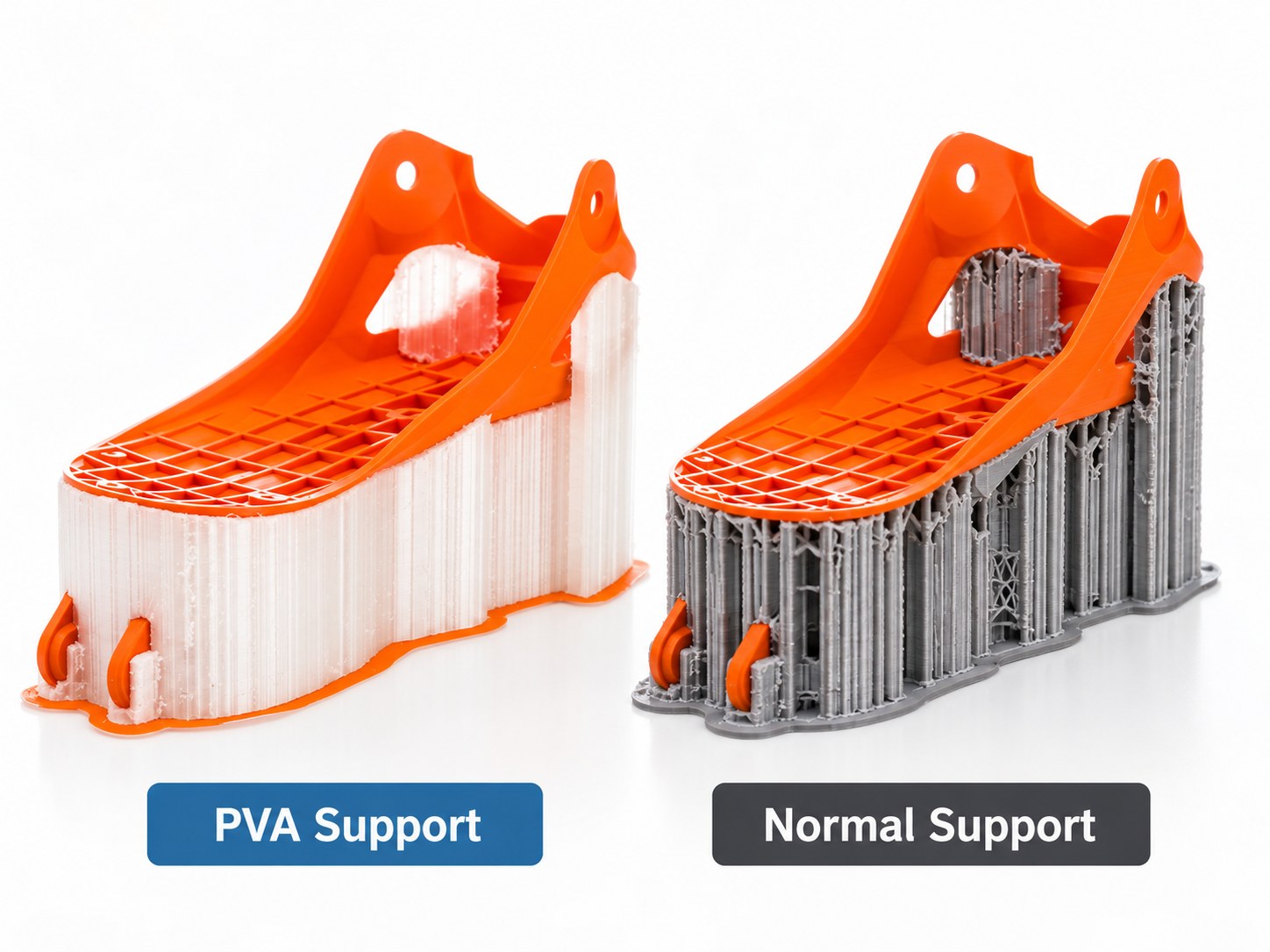
Quick verdict:Soluble support material earns its place when the surface it holds up cannot be reached by hand: internal channels, enclosed cavities, fine overhangs. Breakaway supports are faster and need no bath, and they suit open overhangs and parts that tolerate a firm pull. Interface-only supports sit between the two, spending soluble material only where it touches the part.
Support material is where complex FDM work usually fails. The overhang prints; the removal ruins the part. Choosing between soluble, breakaway and interface-only supports decides how much print time goes into post-processing, and how many parts come off the bed clean.
This guide covers what each support type does, which materials dissolve in what, the settings that decide whether an interface releases or fuses, and the hardware for feeding a second material.
Why support filament decides whether a complex part is printable
Every FDM print is a stack of molten beads, and each bead has to land on something. Overhangs beyond a shallow angle, internal channels and undercuts all need material underneath while the part is built. Without it, the plastic sags or drops onto the layers below.
You have two ways to solve that. Reorient the part, split it, or add a chamfer so nothing hangs in mid-air. Or print a second material whose only job is to hold the overhang and then leave. That route is the only practical answer for internal features a hand tool cannot reach.
The trade is straightforward. A second material means more print time, more preparation and a feed path to manage. What it buys is a support face that releases cleanly and an internal channel that is genuinely open.
Soluble, breakaway and interface-only supports compared
Support approach
How it works
Removal
When it is worth using
Limitations
Soluble support (PVA, HIPS and similar)
A second material is printed as the support structure and later dissolved away
Soak in water or in a solvent, with agitation
Internal channels, enclosed cavities, fine overhangs, parts no tool should touch
Needs a second feed system, drying, purge control and soak time. Produces waste liquid
Breakaway support
Support is printed from a dedicated breakaway grade, or from the model material with a controlled gap
Lifted off by hand or with pliers after the part cools
Open overhangs, large flat underside faces, quick jobs, parts that cannot be wetted
Leaves witness marks on the underside. Thin features can snap. No good for internal channels
Interface-only support
The support body is the model material; only the layers that touch the part use soluble material
Peel the bulk away, then dissolve the thin interface
Tall supports, expensive soluble material, or long prints where dissolve time matters
Purge must be reliable or the model material contaminates the interface and nothing dissolves
A simple way to choose: if a tool can reach the support, breakaway is almost always faster. If it cannot, you need soluble material. If it cannot be reached but the support is tall, use soluble material only at the interface.
How soluble supports work, and what they demand
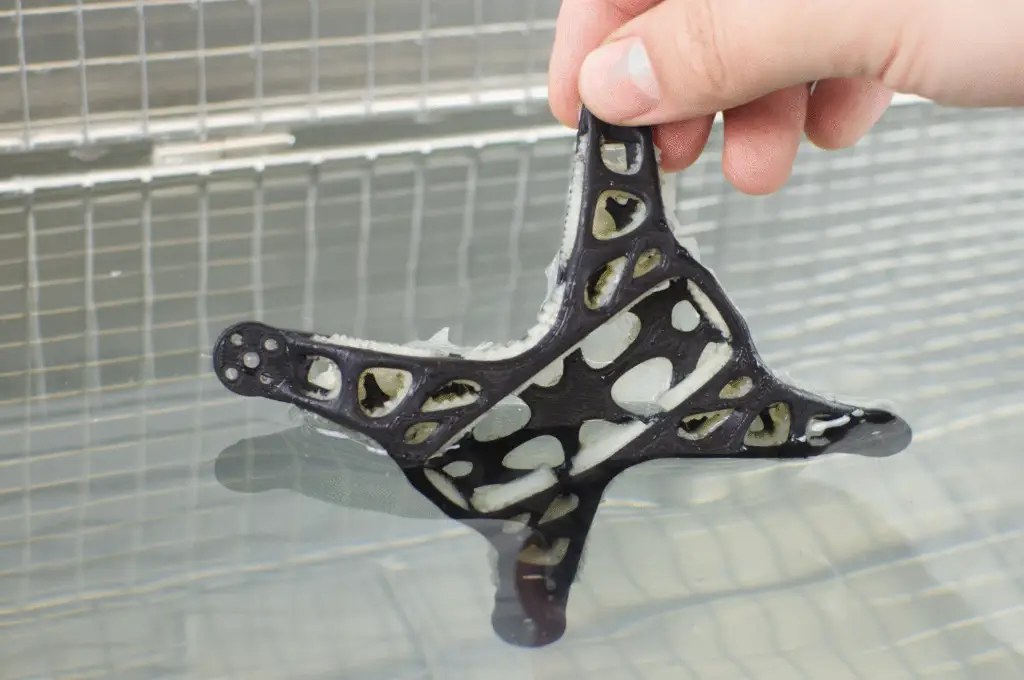
Soluble support material is a polymer with a deliberate weakness: it holds its shape while printing, then breaks down in a liquid that leaves the model material alone. The printer deposits it exactly like ordinary support. Afterwards the part goes into the liquid, the support softens from the outside in, and the dissolved polymer is carried away as the liquid is agitated or changed.
Two variables decide how long that takes: how much soluble material touches the liquid, and how much of the liquid is fresh. A thin interface dissolves in a fraction of the time a solid support block does, and warm water with movement beats still, cold liquid. Deep internal channels dissolve from the ends first and can trap material in the middle, so change the liquid part way through a soak.
The demands are worth planning for. Soluble material needs its own feed path and a purge routine, because model material dragged into the support layers leaves an insoluble speck that never lets go. Most soluble grades are hygroscopic, so they print badly from a spool left open in a humid workshop. Water-based soak systems are simple to dispose of; solvent-based systems need ventilation, storage and a plan for the used solvent.
PVA: water-soluble support material
PVA, polyvinyl alcohol, is the material most people mean when they say soluble support. It dissolves in water, which is why it stays popular: no solvent, no fumes, no special disposal beyond letting solids settle or evaporating the water. Warm water with gentle agitation clears a normal interface in a manageable soak, and the part needs only a rinse and a dry.
Its natural partner is PLA and other low-temperature materials, because it prints in a similar range and bonds weakly enough to release without a fight. Where PVA needs discipline is moisture. A damp spool prints with heavy stringing and inconsistent extrusion, and the finished support may not dissolve cleanly because the material has partly degraded. Dry it before use, keep it sealed with desiccant, and feed it from a dry box if the machine allows. Printing it too hot is the other mistake: overheated PVA can clog and comes out less willing to dissolve.
The material is soft, so slow the support moves down and accept a longer build. In return you get an interface that releases in water and leaves no tool marks.
HIPS: limonene-soluble support material
HIPS, high-impact polystyrene, dissolves in limonene, a citrus-derived solvent. Its value is temperature compatibility: it prints in the same range as ABS and ASA and wants the same warm, enclosed chamber, so it can support materials that PVA cannot survive alongside. Where PVA serves low-temperature plastics, HIPS serves the styrenic family.
The trade is the solvent. Limonene works, but slowly, and it needs movement and patience in a way water does not. It has an odour, it must be used with ventilation, and used solvent has to be stored and dealt with rather than poured away. Filtering and reusing it is worth the effort. Pairing HIPS with PLA wastes time on both sides, because their temperature requirements pull in opposite directions.
Breakaway supports: mechanical removal without a bath
Breakaway supports are printed either from a dedicated breakaway grade in a second extruder, or from the model material itself with a controlled gap between support and part. Dedicated grades bond to themselves but only lightly to the model, so the support comes off as one piece instead of crumbling. The method needs no liquid, no soak tank and no drying afterwards, which is why it suits production work with quick turnarounds.
The gap is the whole game. Too tight and the two fuse, leaving a rough underside you have to sand. Too loose and the overhang sags. The sweet spot is usually about one layer height on a dense interface pattern that gives the model something flat to rest on. Removal is a firm pull, so cool the part fully first: warm plastic tears instead of releasing. Work along the interface rather than yanking from one end.
Where breakaway struggles is thin walls, delicate lattice features and internal cavities, which it will damage or cannot reach at all.
Interface-only supports: soluble material only at the contact surface
Interface-only support is a hybrid, and for many production parts it is the sensible default. The support body is printed in the model material, which is fast and plentiful. Only the few layers that touch the part use soluble material. The bulk peels away by hand and the thin soluble skin dissolves quickly.
This answers the two biggest complaints about soluble supports: material consumed and soak time. A tall support column might be hundreds of layers of model material and four layers of soluble material, so the dissolve drops from hours to something much shorter. What it demands is reliable purge. If model material bleeds into the interface, that skin will not dissolve and the part is scrap.
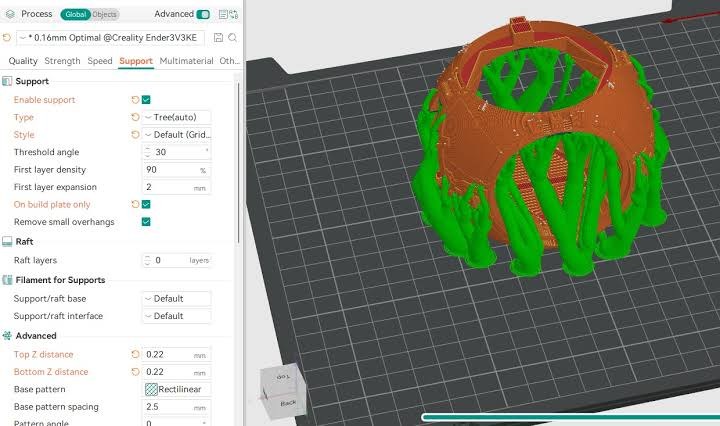
Practical settings: interface layers, Z distance and purge volumes
Most support failures come from slicer settings rather than the material. Check these before a long print.
Setting
Breakaway support
Soluble support
What it controls
Z distance (vertical gap)
Around one layer height, raised if the support fuses
Zero, the support touches the part
Whether the model rests on the support or fuses to it
Interface layers
One or two dense layers at the contact
Two to four dense layers at the contact
How flat and how release-friendly the supported face is
Interface density
Dense, so the overhang has continuous support
Dense, with a pattern that leaves liquid paths
Surface quality and how fast liquid reaches it
Support body density
Sparse, it only has to carry itself
Sparse, unless the interface needs stiffening
Material use, print time and how easily the bulk peels
XY separation
A small offset so walls do not bond to support
A small offset on vertical walls only
Whether the sides of the part release cleanly
Purge volume
Enough to clear the nozzle at every change
More generous, contamination fuses the interface
Interface purity and how much material becomes waste
Support speed
Moderate
Slower, soluble grades print best without rushing
Layer bonding inside the support and clog risk
Drying, storage and priming requirements
Soluble materials are the most moisture-sensitive filament in the workshop, and Malaysia’s humidity does not help. Dry a fresh spool before a long job, store it sealed with desiccant, and print from a dry box where the machine allows. Damp PVA shows itself as stringing, popping at the nozzle and a support that will not dissolve cleanly even after a long soak. HIPS is more forgiving but still prints better dry.
Priming matters as much as drying. A short prime or a purge tower before the support starts keeps the first support layers clean at the cost of a little material. Check the print afterwards: soluble streaks in the model region, or model material in the support interface, mean the purge volume is too low.
Dual-extruder versus AMS-style multi-material systems
Second-material hardware comes in three forms, and the differences matter more for support work than for decorative colour.
Two dedicated nozzles on one carriage, or on independent carriages. Each material has its own hot end, so there is no cross-contamination and no purge waste. The trade-offs are ooze from the idle nozzle, a nozzle offset that must stay calibrated, and a wipe or prime tower to catch drool before it lands on the part.
Independent dual extruders move the nozzles separately, which allows mirror and duplicate printing and lets the idle nozzle park away from the print. For support-heavy work this gives the cleanest interface of the multi-material options.
Single-nozzle material switchers, the AMS-style systems, feed several spools into one hot end. There is no idle-nozzle ooze and no offset to maintain. The cost is purge: every material change wastes filament and time, and for soluble support the purge has to be generous, because a smeared interface will not dissolve. Prints also take longer, and the soluble spool spends its time in the feed path where moisture can reach it.
Which you want depends on volume. If support material is routine in your work, dedicated nozzles pay for themselves in time and material. If you need the option occasionally, a single-nozzle switcher on an FDM 3D printer does the job with less complexity.
Common problems and fixes
Problem
Usual cause
Fix
Soluble support will not dissolve
Damp material, printed too hot, or a contaminated interface
Dry the spool, lower the support temperature, raise purge volume. Use fresh, agitated, warm liquid and change it part way through
Support fuses to the part
Z distance too small, or a gap was needed and none was set
Increase the vertical gap a step at a time for breakaway grades; keep zero gap only for soluble material
Rough or scarred underside
Interface too sparse, so beads sagged into the gaps
Add interface layers and raise interface density
Blobs on the part from the idle nozzle
Ooze from the nozzle that is not printing
Enable a prime or wipe tower, park the idle nozzle, or lower its standby temperature
Nozzle clogs on soluble material
Heat creep, moisture, or too high a temperature for a soft grade
Dry the filament, reduce temperature, slow the moves, check hot end cooling
Support tip breaks during the print
Support tower too thin, or too sparse at the contact
Widen the support, add a brim to the support body, thicken the interface
Wasteful soak times
A solid soluble block dissolving from the outside only
Switch to interface-only support, or thin the interface so liquid reaches it faster
Vertical walls bonded to support
XY separation too small
Increase the horizontal offset so side faces release without marks
Frequently asked questions
Do you need a dual extruder to print soluble supports?
You need a way to feed two materials. A dual-extruder machine with a dedicated support nozzle is the simplest arrangement, because there is no cross-contamination. Single-nozzle switchers also work and suit occasional use, but they need generous purge volumes and add print time.
What does PVA support filament dissolve in?
Water, ideally warm and moving. PVA is polyvinyl alcohol, a water-soluble polymer, so the finished part soaks until the support releases. There is no solvent to store and no fume problem. HIPS is the different case: it dissolves in limonene, a solvent that needs ventilation and safe disposal.
Can you print supports without a second material?
Yes, and for many parts you should. The same material with a controlled gap and a dense interface will hold an open overhang and pull away by hand, and a dedicated breakaway grade improves the release. What it cannot do is reach inside an enclosed cavity, which is where soluble material becomes the only practical option.
How long does soluble support take to dissolve?
It depends on how much soluble material there is, how thick it is and how the liquid moves. A thin interface layer clears far faster than a solid support block, which is the whole reason interface-only support exists. Warm liquid, agitation and changing it part way through all shorten the wait.
Is soluble support filament worth it for small workshops?
It is worth it when the geometry demands it. If your parts are brackets, jigs and enclosures with open overhangs, breakaway support and sensible orientation handle almost everything. Add soluble material when you print internal channels, ducts and cavities, or fine overhangs that must come out clean without sanding.