TPU 3D Printing: Material Properties, Settings, and Applications
TPU 3D Printing: Material Properties, Settings, and Applications
TPU 3D printing has transformed the capabilities of desktop additive manufacturing by enabling the production of flexible, rubber-like parts on standard FDM printers. Thermoplastic polyurethane (TPU) is one of the most practical flexible filaments available, offering an exceptional combination of elasticity, impact resistance, and printability that opens up entirely new application categories for 3D printed parts.
Unlike rigid materials such as PLA, ABS, or PETG, TPU behaves like rubber when printed, allowing parts to bend, stretch, compress, and absorb impact without cracking or breaking. This unique material property has made TPU indispensable for functional prototyping, wearable devices, protective enclosures, and industrial applications where flexible components are required.
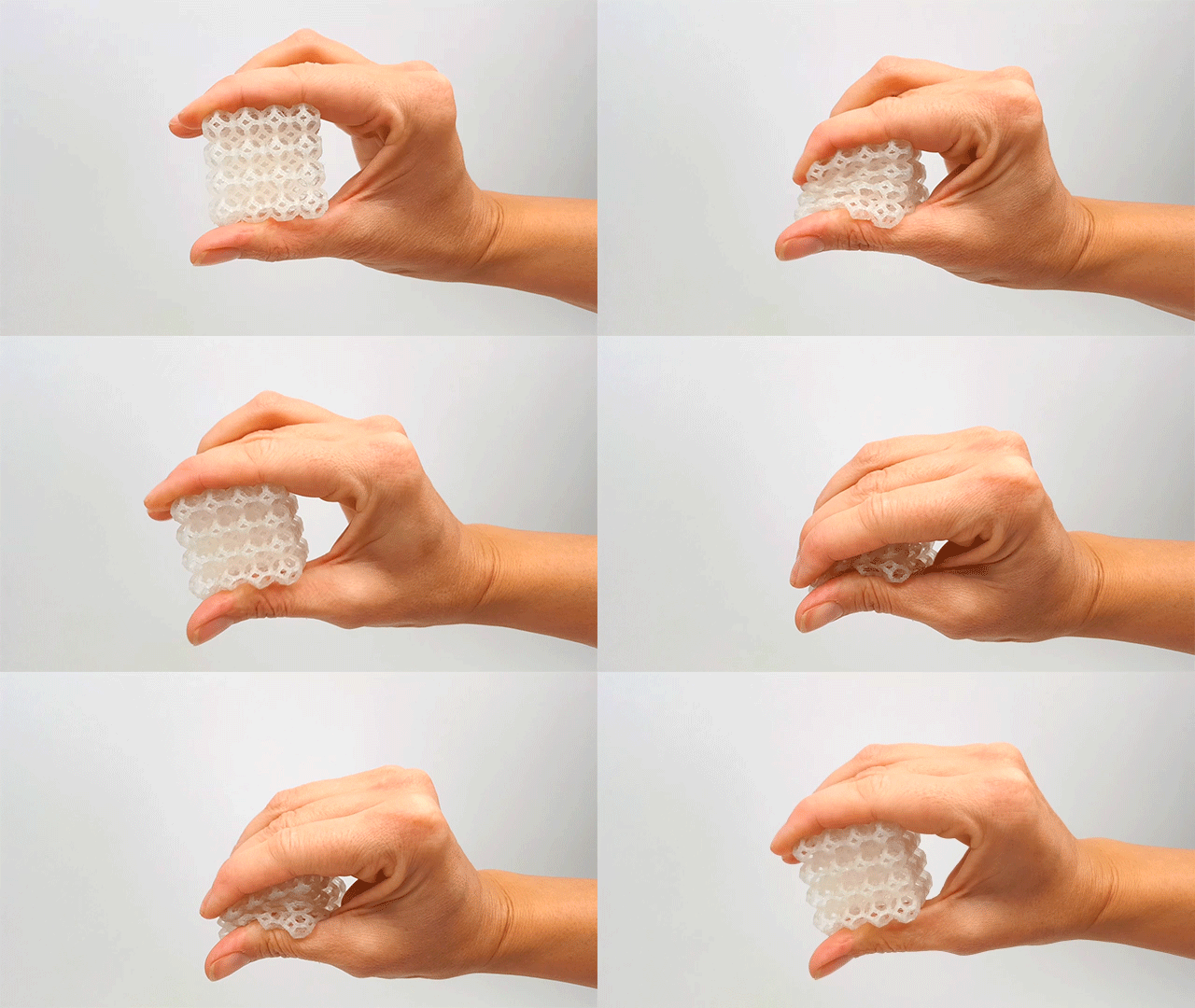
TPU filament produces flexible, rubber-like 3D printed parts ideal for functional applications requiring shock absorption and impact resistance
What is TPU Filament?
Thermoplastic polyurethane belongs to the thermoplastic elastomer (TPE) family, exhibiting characteristics of both plastic and rubber. Like other TPEs, TPU shows the strength of plastic when cool combined with the elasticity of rubber when heated and extruded through a 3D printer nozzle.
On a chemical level, TPU is a block copolymer made up of alternating hard segments (isocyanates) and soft segments (reacted polyol). Manufacturers adjust the ratio between these segments to control the final material properties. More soft segments produce a more flexible material, while more hard segments create a firmer result. This variability allows TPU formulations to range from soft and pliable (around 60A Shore hardness) to firm and impact-resistant (up to 80D Shore hardness).
For desktop FDM 3D printing, the most common TPU formulations fall in the 85A to 98A Shore hardness range, often simply labeled as TPU 85A, TPU 95A, or similar designations. The numerical designation indicates relative hardness, with lower numbers representing softer materials and higher numbers representing firmer materials.
Material Properties of TPU
TPU offers a unique combination of material properties that make it suitable for demanding applications where rigid plastics would fail. Understanding these properties helps determine whether TPU is the right material for a given project.
Key Mechanical Properties
Flexibility: TPU can bend and return to its original shape, behaving like rubber rather than rigid plastic. The flexibility ranges from soft and pliable to firm and impact-resistant depending on the specific formulation.
High Elongation: TPU can stretch significantly before breaking, with some formulations achieving 500-660% elongation at break. This makes it ideal for parts that must endure repeated stretching or bending.
Impact Resistance: TPU absorbs impact energy rather than transferring it, protecting delicate components and providing shock absorption for wearable or protective applications.
Abrasion Resistance: TPU withstands surface damage from friction and wear, making it suitable for parts like conveyor guides, protective bumpers, and shoe soles.
Chemical Resistance: Polyester TPU formulations resist oils and greases effectively, while polyether TPU formulations perform better in moist environments.
Low-Temperature Performance: TPU retains flexibility at low temperatures and resists cold cracking, unlike some other flexible materials.
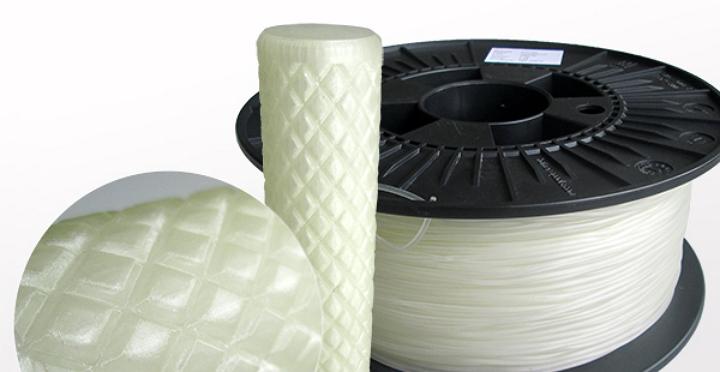
Premium TPU filaments like MakeShaper offer FDA-compliant flexible materials suitable for functional and wearable applications
TPU vs PLA: Key Differences
Understanding the differences between TPU and PLA helps in material selection. While PLA is rigid and holds crisp shapes easily, TPU bends and returns to its original form. PLA cracks under heavy impact, while TPU absorbs the energy. For friction and abrasion resistance, TPU significantly outperforms PLA.
In terms of printability, PLA is easier to print with wider acceptable temperature ranges and less demanding hardware requirements. TPU requires lower print speeds, careful moisture management, and ideally a direct-drive extruder for reliable feeding.
Property
TPU
PLA
Flexibility
High (rubber-like)
Low (rigid)
Impact Resistance
Excellent
Moderate
Abrasion Resistance
High
Low-Medium
Print Difficulty
Medium-High
Low
Moisture Sensitivity
High
Low-Medium
Bridges and Overhangs
Poor
Good
TPU 3D Printing Settings
Successful TPU 3D printing requires specific settings that differ significantly from rigid filament printing. The flexible nature of TPU demands adjustments to speed, temperature, and hardware configuration to achieve reliable extrusion and quality prints.
Hardware Requirements
Before attempting to print TPU, verify that your hardware can handle flexible filaments reliably. Direct-drive extruders are strongly preferred over Bowden setups because the short filament path from gear to nozzle provides better control over the flexible material. Bowden extruders can cause the filament to buckle or coil inside the tube, leading to jams and feeding issues.
The build surface also matters for TPU. Blue painter’s tape applied to a bare bed or glass coated with glue stick provides adequate first-layer adhesion without creating too strong a bond. PEI sheets and BuildTak should generally be avoided as the adhesion can become permanent, making part removal difficult.
Recommended Print Settings
Nozzle Temperature: 220-240°C for most TPU 95A formulations, though some high-flow variants print well at slightly lower temperatures
Bed Temperature: 50-60°C provides good first-layer adhesion without causing excessive sticking
Print Speed: 20-30mm/s is recommended for standard TPU; high-flow TPU variants may tolerate 50-100mm/s
Retraction Settings: Conservative retraction distances (1-2mm for direct drive, 3-5mm for Bowden) at lower speeds (20-30mm/s) to avoid clogging
Layer Height: 0.1-0.2mm for best quality; TPU can print successfully at 0.3mm layers for faster production
Cooling Fan: 0-30% during printing; too much cooling causes poor layer bonding while some cooling helps with overhangs
Filament Moisture Management
TPU is hygroscopic and absorbs moisture from the air readily. Moist TPU produces prints with surface blemishes, excessive stringing, and a characteristic popping sound during extrusion. Drying TPU filament before printing is essential for quality results.
Standard drying conditions are 50-60°C for 4-6 hours in a filament dryer or oven. Some harder TPU formulations like BigRep TPU 98A require higher drying temperatures of 80°C for the same duration. Always check the manufacturer’s recommendations for your specific filament.
For storage, keep TPU in an airtight container with desiccant packets. Even during a single print session, exposed filament can absorb enough moisture to affect print quality if the session lasts more than a few hours.
Common TPU 3D Printing Applications
TPU use cases span consumer products, industrial components, and specialized applications where flexible materials provide functional advantages over rigid plastics.
Protective and Wearable Applications
Phone Cases and Device Covers: TPU provides shock absorption and a comfortable grip that rigid plastics cannot match. The material protects devices from drops while conforming to the hand.
Watch Bands and Wearables: FDA-compliant TPU formulations enable the production of wearable components that contact skin without irritation.
Protective Gear: Helmet padding, sports equipment guards, and safety gear benefit from TPU impact absorption and flexibility.
Functional Industrial Components
Seals and Gaskets: TPU chemical resistance and flexibility make it suitable for oil-resistant seals and gaskets in mechanical assemblies.
Cable and Wire Jacketing: The material protects cables while providing flexibility for routing through tight spaces.
Vibration Dampening Mounts: TPU absorbs vibration effectively, reducing noise and wear in machinery and electronic equipment.
Flexible Hinges and Snap Fits: The material tolerates repeated bending and compression better than rigid plastics, extending product life.
Consumer Products
Shoe Soles and Orthotics: TPU durability and flexibility suit shoe sole prototyping and custom orthotic devices.
Tool Handles and Grips: The soft-touch feel of TPU improves comfort and reduces slippage on tool handles.
RC Vehicle Components: TPU tires, wheels, and bumpers for remote-controlled vehicles benefit from the material’s impact resistance and grip.
Furniture Support Pads: Desk leg caps and furniture feet made from TPU prevent scratching and reduce noise when moving furniture.
Tips for Successful TPU Printing
Printing with TPU successfully requires adjusting your workflow and expectations compared to rigid filaments. The following tips help avoid common issues and achieve consistent results.
First, always dry your TPU filament before printing. Even filament that appears dry can contain enough moisture to cause problems. The drying step takes additional time but prevents frustration from failed prints.
Second, slow down. TPU requires significantly slower print speeds than rigid materials. Printing at 20-30mm/s rather than the 50-60mm/s typical for PLA dramatically improves success rates and surface quality.
Third, avoid crossing open spaces with travel moves. When the nozzle travels over gaps without deposited material, any stringing becomes visible. Use travel optimization features in your slicer to minimize crossing open areas.
Fourth, be patient with first layers. TPU requires careful bed leveling and consistent first-layer adhesion. Take extra time with bed preparation using glue stick or painter’s tape to ensure the first layer sticks properly without being too bonded to the surface.
Conclusion
TPU 3D printing expands the capabilities of desktop FDM technology to include flexible, rubber-like parts that were previously impossible to produce on standard equipment. While TPU requires adjusted settings and careful moisture management compared to rigid filaments, the unique properties it offers make the extra effort worthwhile for functional prototyping, wearable devices, protective components, and consumer products.
Understanding TPU material properties, configuring appropriate print settings, and following proper filament storage practices enable consistent successful prints. The wide range of available TPU formulations from 85A to 98A Shore hardness allows selection of the right balance of flexibility and printability for specific applications.
Whether creating shock-absorbing protective cases, comfortable wearable devices, durable industrial seals, or custom consumer products, TPU provides capabilities that rigid materials cannot match. Adding TPU to your material repertoire significantly expands the range of problems solvable through 3D printing.
Thank you for signing up. You will be the first to know the Industry news, upcoming products, latest technology and special promotion.